A step-by-step guide to setting up and managing job search notifications from Upwork in Telegram.
Job search notifications help you stay informed without constant monitoring, ensuring you don’t miss any opportunities. To set them up in Telegram, follow steps below.
Step 1: Access Notification Settings
Go to Dashboard in the main navigation menu > Notifications.
Locate Telegram from the list of available integrations.
Step 2: Start Telegram Bot
Click on Setup next to Telegram.
You will be redirected to Telegram to authorize the connection.
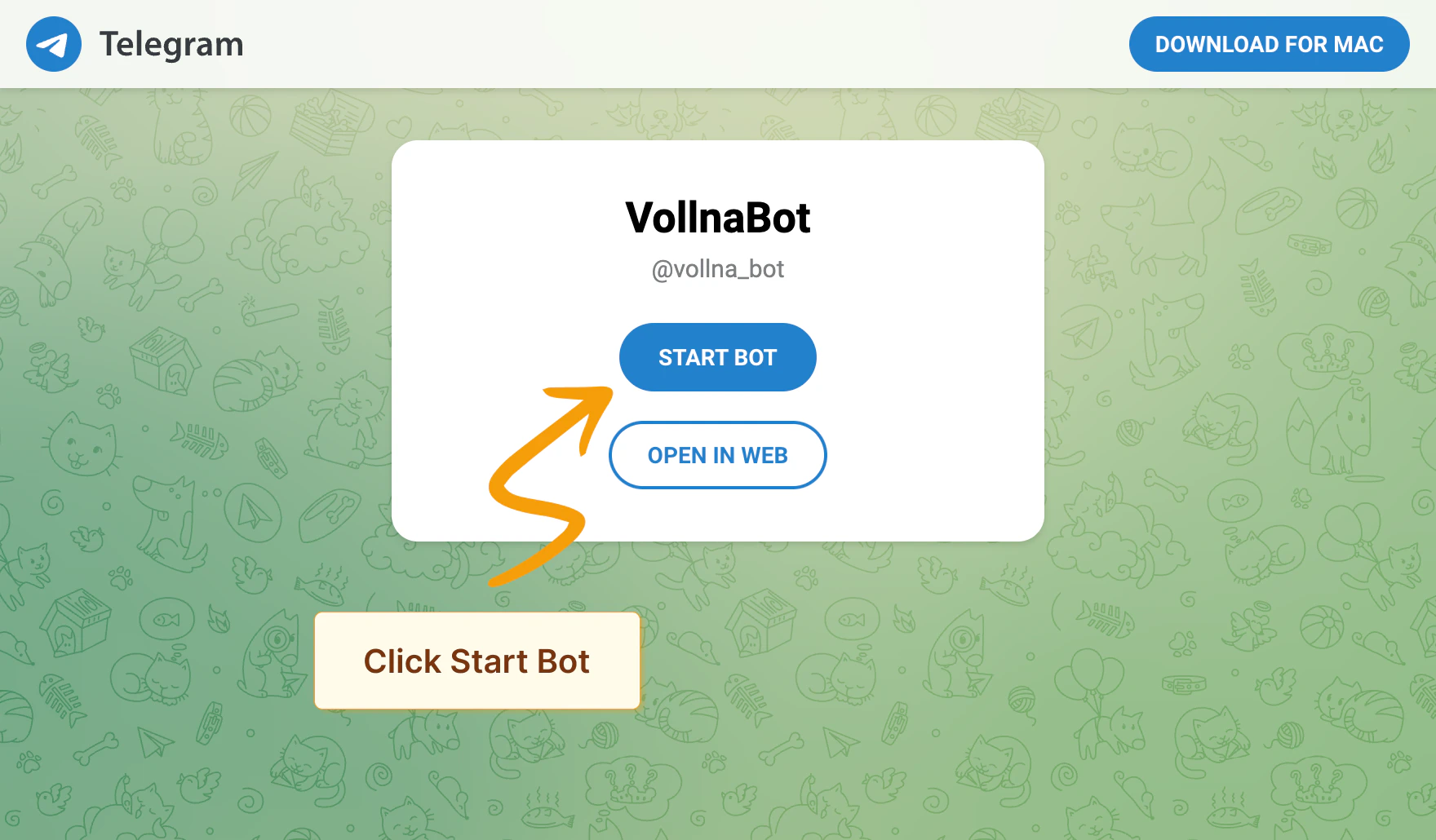
Follow the on-screen instructions to link your Telegram account with Vollna to create a new chat with the bot:
a. Click on Start Bot button.
b. Telegram app will be opened. Click on Start button.
c. Bot will send you verification link. Click on it to verify notification setup.
Managing Channels
You can add @vollna_bot to any Telegram group or channel:
Add @vollna_bot as a member to your group or channel
Send the command /start @vollna_bot in the chat
Click the verification link sent by the bot to complete the setup
For channels, make sure to give the bot admin rights so it can post messages.
Step 3: Assign Filters
After Telegram bot is connected, you’ll be redirected to the notifications setup page where you can assign one or multiple filters to your Telegram group or channel.
Read more about how to manage filters
Notification Types
You can choose between two types of notifications in Telegram:
Short Notification
Sends a brief summary of new job postings, including the title, budget, site, and time of publication. This option groups multiple projects in a single notification.
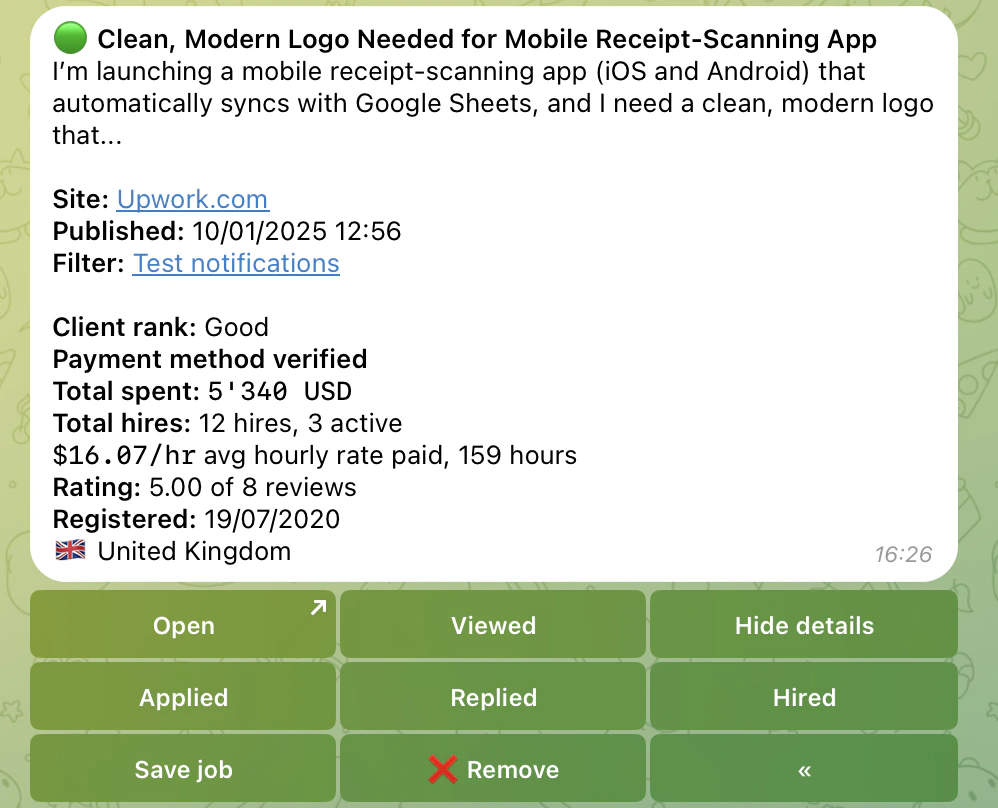
Detailed Notification
Provides a detailed summary of the job posting, including additional information such as short description, client rating, payment method verification and total spent. This option sends a separate notification for each new job posting.
Following these steps, you can efficiently set up and manage Job Search notifications in Telegram, ensuring you stay updated with the latest opportunities.
For more information, check out our guides on setting up notifications in Discord and Slack.
Was this page helpful?
{"docsConfig":{"theme":"mint","$schema":"https://mintlify.com/docs.json","name":"Vollna Docs","colors":{"primary":"#2563eb","light":"#60a5fa","dark":"#2563eb"},"logo":{"light":"https://mintcdn.com/acme-d4aec364/bKzghC5RjKIJCXZt/images/logo/light.svg?fit=max\u0026auto=format\u0026n=bKzghC5RjKIJCXZt\u0026q=85\u0026s=76f3cdb5b9d10192674b81cab4614707","dark":"https://mintcdn.com/acme-d4aec364/bKzghC5RjKIJCXZt/images/logo/dark.svg?fit=max\u0026auto=format\u0026n=bKzghC5RjKIJCXZt\u0026q=85\u0026s=05cc69834a85ee7446bfe1d919b2dcd7"},"favicon":"https://mintcdn.com/acme-d4aec364/bKzghC5RjKIJCXZt/favicons/favicon.svg?fit=max\u0026auto=format\u0026n=bKzghC5RjKIJCXZt\u0026q=85\u0026s=cfaddc7cf90782012ecf6a7e8120e886","api":{"playground":{"proxy":false}},"navbar":{"links":[{"href":"https://www.vollna.com/blog","label":"Blog"},{"href":"https://www.vollna.com/contact","label":"Support"}],"primary":{"type":"button","label":"Get Started","href":"https://www.vollna.com/"}},"footer":{"socials":{"x":"https://x.com/vollna_app","facebook":"https://www.facebook.com/vollna","telegram":"https://t.me/vollna","linkedin":"https://www.linkedin.com/company/vollna"}},"integrations":{"posthog":{"apiKey":"phc_zAn3192UkKLcl4vF8RGGXo5WkK4yIe5v01feRXp7GNp","apiHost":"https://xpaie.vollna.com"}},"styling":{"latex":true},"navigation":{"global":{"anchors":[]},"pages":[]}},"deployment":{"deploymentMetadataValue":{"subdomain":"acme-d4aec364","hasAudioNarration":false,"actualSubdomain":"acme-d4aec364","customDomains":["www.vollna.com"],"gitSource":{"type":"github","owner":"hebrianvasyl","repo":"documentation","deployBranch":"main","contentDirectory":"","isPrivate":true,"mountPath":"","label":""},"feedback":{"thumbs":true},"entitlements":{},"buildId":"6afc437c0f5b3ebb6d3adc89","clientVersion":"0.0.4270","searchFilterCounts":[{"language":"default","tag":"API Reference","count":80},{"language":"default","tag":"Documentation","count":44},{"language":"default","tag":"Filters","count":24},{"language":"default","tag":"Auto Bidding","count":23},{"language":"default","tag":"Proposal Templates","count":18},{"language":"default","tag":"Auto-Bidding","count":10},{"language":"default","tag":"Market Insights","count":8},{"language":"default","tag":"Integrations","count":7},{"language":"default","tag":"Notifications","count":7},{"language":"default","tag":"AI Qualifier","count":5}]},"assistantConfig":{},"basePath":"/docs","hasChatPermissions":false,"hasWebMcpPermissions":false,"toggles":[{"name":"kill-isr","enabled":true,"variant":{"name":"disabled","enabled":false,"feature_enabled":true},"impressionData":false},{"name":"custom-rbac-roles","enabled":true,"variant":{"name":"disabled","enabled":false,"feature_enabled":true},"impressionData":false},{"name":"agent-mintlify-slack","enabled":true,"variant":{"name":"disabled","enabled":false,"feature_enabled":true},"impressionData":false},{"name":"agent-integrations-settings","enabled":true,"variant":{"name":"disabled","enabled":false,"feature_enabled":true},"impressionData":false},{"name":"rbac-expansion","enabled":true,"variant":{"name":"disabled","enabled":false,"feature_enabled":true},"impressionData":false},{"name":"automations-pr-grouping","enabled":true,"variant":{"name":"disabled","enabled":false,"feature_enabled":true},"impressionData":false},{"name":"custom-prefix","enabled":true,"variant":{"name":"disabled","enabled":false,"feature_enabled":true},"impressionData":false},{"name":"analytics-v7","enabled":true,"variant":{"name":"disabled","enabled":false,"feature_enabled":true},"impressionData":false},{"name":"user-flows-analytics","enabled":true,"variant":{"name":"disabled","enabled":false,"feature_enabled":true},"impressionData":false},{"name":"no-publish-flow","enabled":true,"variant":{"name":"disabled","enabled":false,"feature_enabled":true},"impressionData":false},{"name":"workos-onboarding","enabled":true,"variant":{"name":"disabled","enabled":false,"feature_enabled":true},"impressionData":false},{"name":"snapshot-serving-live","enabled":true,"variant":{"name":"disabled","enabled":false,"feature_enabled":true},"impressionData":false},{"name":"stripTemperatureMiddleware","enabled":true,"variant":{"name":"disabled","enabled":false,"feature_enabled":true},"impressionData":false},{"name":"support-platform-pylon-zendesk","enabled":true,"variant":{"name":"disabled","enabled":false,"feature_enabled":true},"impressionData":false},{"name":"snapshot-serving","enabled":true,"variant":{"name":"disabled","enabled":false,"feature_enabled":true},"impressionData":false},{"name":"instant-rollback","enabled":true,"variant":{"name":"disabled","enabled":false,"feature_enabled":true},"impressionData":false},{"name":"granular-notifications-server","enabled":true,"variant":{"name":"disabled","enabled":false,"feature_enabled":true},"impressionData":false},{"name":"granular-notifications","enabled":true,"variant":{"name":"disabled","enabled":false,"feature_enabled":true},"impressionData":false},{"name":"automations-fable","enabled":true,"variant":{"name":"disabled","enabled":false,"feature_enabled":true},"impressionData":false},{"name":"fixed-ai-action-pricing","enabled":true,"variant":{"name":"disabled","enabled":false,"feature_enabled":true},"impressionData":false},{"name":"site-roles","enabled":true,"variant":{"name":"disabled","enabled":false,"feature_enabled":true},"impressionData":false},{"name":"automation-resolve-merge-conflict","enabled":true,"variant":{"name":"disabled","enabled":false,"feature_enabled":true},"impressionData":false},{"name":"scoped-publishing","enabled":true,"variant":{"name":"disabled","enabled":false,"feature_enabled":true},"impressionData":false},{"name":"mintql","enabled":true,"variant":{"name":"disabled","enabled":false,"feature_enabled":true},"impressionData":false},{"name":"page-level-analytics","enabled":true,"variant":{"name":"disabled","enabled":false,"feature_enabled":true},"impressionData":false},{"name":"editor-version-history-v2","enabled":true,"variant":{"name":"disabled","enabled":false,"feature_enabled":true},"impressionData":false},{"name":"billing-page-v2","enabled":true,"variant":{"name":"disabled","enabled":false,"feature_enabled":true},"impressionData":false},{"name":"full-page-search","enabled":true,"variant":{"name":"disabled","enabled":false,"feature_enabled":true},"impressionData":false},{"name":"workspace-projects","enabled":true,"variant":{"name":"disabled","enabled":false,"feature_enabled":true},"impressionData":false},{"name":"assistant-v5","enabled":true,"variant":{"name":"disabled","enabled":false,"feature_enabled":true},"impressionData":false},{"name":"fork-pr-previews","enabled":true,"variant":{"name":"disabled","enabled":false,"feature_enabled":true},"impressionData":false},{"name":"revalidation-jwt","enabled":true,"variant":{"name":"disabled","enabled":false,"feature_enabled":true},"impressionData":false},{"name":"workos-sso-scim","enabled":true,"variant":{"name":"disabled","enabled":false,"feature_enabled":true},"impressionData":false},{"name":"hobby-abuse-scan","enabled":true,"variant":{"name":"disabled","enabled":false,"feature_enabled":true},"impressionData":false},{"name":"dashboard-inbox","enabled":true,"variant":{"name":"disabled","enabled":false,"feature_enabled":true},"impressionData":false},{"name":"workos-signup","enabled":true,"variant":{"name":"disabled","enabled":false,"feature_enabled":true},"impressionData":false},{"name":"turbopuffer-dual-write","enabled":true,"variant":{"name":"disabled","enabled":false,"feature_enabled":true},"impressionData":false},{"name":"workos-enabled","enabled":true,"variant":{"name":"disabled","enabled":false,"feature_enabled":true},"impressionData":false},{"name":"approve-review-flow","enabled":true,"variant":{"name":"disabled","enabled":false,"feature_enabled":true},"impressionData":false},{"name":"editor-metadata","enabled":true,"variant":{"name":"disabled","enabled":false,"feature_enabled":true},"impressionData":false},{"name":"sso-setup-deadline-banner","enabled":true,"variant":{"name":"disabled","enabled":false,"feature_enabled":true},"impressionData":false},{"name":"turbopuffer-serve","enabled":true,"variant":{"name":"disabled","enabled":false,"feature_enabled":true},"impressionData":false},{"name":"live-agents","enabled":true,"variant":{"name":"disabled","enabled":false,"feature_enabled":true},"impressionData":false},{"name":"starter-pricing","enabled":true,"variant":{"name":"control","enabled":true,"payload":{"type":"string","value":"control"},"feature_enabled":true},"impressionData":false},{"name":"llms-txt-v2","enabled":true,"variant":{"name":"disabled","enabled":false,"feature_enabled":true},"impressionData":false},{"name":"wildcard-email-auth","enabled":true,"variant":{"name":"disabled","enabled":false,"feature_enabled":true},"impressionData":false}],"googleFontsInlined":false},"customCss":[{"filePath":"style.css","content":"div:has(>[data-name=\"frame\"])+div:has(>[data-name=\"frame\"]){margin-top:1.5rem}"}]}
{"page":{"pagePath":"notifications/telegram","slug":"/notifications/telegram","pageMetadata":{"title":"Setting Up Notifications in Telegram","sidebarTitle":"Telegram","description":"A step-by-step guide to setting up and managing job search notifications from Upwork in Telegram.","icon":"telegram","href":"/notifications/telegram"},"description":{"compiledSource":"\"use strict\";\nconst {jsx: _jsx} = arguments[0];\nconst {useMDXComponents: _provideComponents} = arguments[0];\nfunction _createMdxContent(props) {\n const _components = {\n p: \"p\",\n ..._provideComponents(),\n ...props.components\n };\n return _jsx(_components.p, {\n children: \"A step-by-step guide to setting up and managing job search notifications from Upwork in Telegram.\"\n });\n}\nfunction MDXContent(props = {}) {\n const {wrapper: MDXLayout} = {\n ..._provideComponents(),\n ...props.components\n };\n return MDXLayout ? _jsx(MDXLayout, {\n ...props,\n children: _jsx(_createMdxContent, {\n ...props\n })\n }) : _createMdxContent(props);\n}\nreturn {\n default: MDXContent\n};\n","frontmatter":{},"scope":{}},"pageType":"default","mdx":{"mdxSource":{"compiledSource":"\"use strict\";const{Fragment:_Fragment,jsx:_jsx,jsxs:_jsxs}=arguments[0];const{useMDXComponents:_provideComponents}=arguments[0];function _createMdxContent(props){const _components={a:`a`,code:`code`,li:`li`,ol:`ol`,p:`p`,strong:`strong`,..._provideComponents(),...props.components},{Frame,Heading,OptimizedImage,Tip}=_components;if(!Frame)_missingMdxReference(`Frame`,true);if(!Heading)_missingMdxReference(`Heading`,true);if(!OptimizedImage)_missingMdxReference(`OptimizedImage`,true);if(!Tip)_missingMdxReference(`Tip`,true);return _jsxs(_Fragment,{children:[_jsx(_components.p,{children:`Job search notifications help you stay informed without constant monitoring, ensuring you don’t miss any opportunities. To set them up in Telegram, follow steps below.`}),`\n`,_jsx(Heading,{level:`2`,id:`step-1-access-notification-settings`,children:`Step 1: Access Notification Settings`}),`\n`,_jsxs(_components.ol,{children:[`\n`,_jsxs(_components.li,{children:[`Go to `,_jsx(_components.strong,{children:`Dashboard`}),` in the main navigation menu > `,_jsx(_components.strong,{children:`Notifications`}),`.`]}),`\n`,_jsx(_components.li,{children:`Locate Telegram from the list of available integrations.`}),`\n`]}),`\n`,_jsx(Frame,{children:_jsx(OptimizedImage,{src:`https://mintcdn.com/acme-d4aec364/H2usirO0P17TGa6B/images/vollna-telegram-notifications-interface.png?fit=max\u0026auto=format\u0026n=H2usirO0P17TGa6B\u0026q=85\u0026s=392611bc8ad5885a60b2c86459a44d84`,alt:`Telegram notification settings in the Vollna dashboard`,style:{borderRadius:`0.5rem`},\"data-og-width\":`2714`,width:`2714`,\"data-og-height\":`1856`,height:`1856`,\"data-path\":`images/vollna-telegram-notifications-interface.png`,\"data-optimize\":`true`,\"data-opv\":`3`,srcset:`https://mintcdn.com/acme-d4aec364/H2usirO0P17TGa6B/images/vollna-telegram-notifications-interface.png?w=280\u0026fit=max\u0026auto=format\u0026n=H2usirO0P17TGa6B\u0026q=85\u0026s=0fdb2452b28d2ec6d8068fc02de4ff9b 280w, https://mintcdn.com/acme-d4aec364/H2usirO0P17TGa6B/images/vollna-telegram-notifications-interface.png?w=560\u0026fit=max\u0026auto=format\u0026n=H2usirO0P17TGa6B\u0026q=85\u0026s=bffaf3609d50205456208e300fa261ab 560w, https://mintcdn.com/acme-d4aec364/H2usirO0P17TGa6B/images/vollna-telegram-notifications-interface.png?w=840\u0026fit=max\u0026auto=format\u0026n=H2usirO0P17TGa6B\u0026q=85\u0026s=e359fce8862193433949b106ce0f0483 840w, https://mintcdn.com/acme-d4aec364/H2usirO0P17TGa6B/images/vollna-telegram-notifications-interface.png?w=1100\u0026fit=max\u0026auto=format\u0026n=H2usirO0P17TGa6B\u0026q=85\u0026s=ab8ae41bf7e1b55a0513a19c4fb07843 1100w, https://mintcdn.com/acme-d4aec364/H2usirO0P17TGa6B/images/vollna-telegram-notifications-interface.png?w=1650\u0026fit=max\u0026auto=format\u0026n=H2usirO0P17TGa6B\u0026q=85\u0026s=7d48d6227e0386fbfb72645920f424da 1650w, https://mintcdn.com/acme-d4aec364/H2usirO0P17TGa6B/images/vollna-telegram-notifications-interface.png?w=2500\u0026fit=max\u0026auto=format\u0026n=H2usirO0P17TGa6B\u0026q=85\u0026s=b7c0963afaa6d0366d3afb13bb0fc029 2500w`})}),`\n`,_jsx(Heading,{level:`2`,id:`step-2-start-telegram-bot`,children:`Step 2: Start Telegram Bot`}),`\n`,_jsxs(_components.ol,{children:[`\n`,_jsxs(_components.li,{children:[`Click on `,_jsx(_components.strong,{children:`Setup`}),` next to Telegram.`]}),`\n`,_jsx(_components.li,{children:`You will be redirected to Telegram to authorize the connection.`}),`\n`,_jsxs(_components.li,{children:[`Follow the on-screen instructions to link your Telegram account with Vollna to create a new chat with the bot:\na. Click on `,_jsx(_components.strong,{children:`Start Bot`}),` button.\nb. Telegram app will be opened. Click on `,_jsx(_components.strong,{children:`Start`}),` button.\nc. Bot will send you verification link. Click on it to verify notification setup.`]}),`\n`]}),`\n`,_jsx(Frame,{children:_jsx(OptimizedImage,{src:`https://mintcdn.com/acme-d4aec364/H2usirO0P17TGa6B/images/vollna-start-telegram-bot.png?fit=max\u0026auto=format\u0026n=H2usirO0P17TGa6B\u0026q=85\u0026s=cfa503c50a4b600aaad4072ae9bc104f`,alt:`Telegram bot setup showing the Start Bot button and verification link`,style:{borderRadius:`0.5rem`},\"data-og-width\":`1760`,width:`1760`,\"data-og-height\":`1030`,height:`1030`,\"data-path\":`images/vollna-start-telegram-bot.png`,\"data-optimize\":`true`,\"data-opv\":`3`,srcset:`https://mintcdn.com/acme-d4aec364/H2usirO0P17TGa6B/images/vollna-start-telegram-bot.png?w=280\u0026fit=max\u0026auto=format\u0026n=H2usirO0P17TGa6B\u0026q=85\u0026s=75f4a45c5451616860bc6fa3caf4dade 280w, https://mintcdn.com/acme-d4aec364/H2usirO0P17TGa6B/images/vollna-start-telegram-bot.png?w=560\u0026fit=max\u0026auto=format\u0026n=H2usirO0P17TGa6B\u0026q=85\u0026s=0231841c168cc708f63b9fa1c3926b44 560w, https://mintcdn.com/acme-d4aec364/H2usirO0P17TGa6B/images/vollna-start-telegram-bot.png?w=840\u0026fit=max\u0026auto=format\u0026n=H2usirO0P17TGa6B\u0026q=85\u0026s=35be26eb68c1a43df2dd19f6de07bd7f 840w, https://mintcdn.com/acme-d4aec364/H2usirO0P17TGa6B/images/vollna-start-telegram-bot.png?w=1100\u0026fit=max\u0026auto=format\u0026n=H2usirO0P17TGa6B\u0026q=85\u0026s=374cbb5ad860c370bf62e82819d5b84d 1100w, https://mintcdn.com/acme-d4aec364/H2usirO0P17TGa6B/images/vollna-start-telegram-bot.png?w=1650\u0026fit=max\u0026auto=format\u0026n=H2usirO0P17TGa6B\u0026q=85\u0026s=7fe60c658db3880323107142c2d87d3c 1650w, https://mintcdn.com/acme-d4aec364/H2usirO0P17TGa6B/images/vollna-start-telegram-bot.png?w=2500\u0026fit=max\u0026auto=format\u0026n=H2usirO0P17TGa6B\u0026q=85\u0026s=a4cfb17eb6cb517c2bb41b0fc96ab33b 2500w`})}),`\n`,_jsx(Heading,{level:`4`,id:`managing-channels`,children:`Managing Channels`}),`\n`,_jsx(_components.p,{children:`You can add @vollna_bot to any Telegram group or channel:`}),`\n`,_jsxs(_components.ol,{children:[`\n`,_jsx(_components.li,{children:`Add @vollna_bot as a member to your group or channel`}),`\n`,_jsxs(_components.li,{children:[`Send the command `,_jsx(_components.code,{children:`/start @vollna_bot`}),` in the chat`]}),`\n`,_jsx(_components.li,{children:`Click the verification link sent by the bot to complete the setup`}),`\n`]}),`\n`,_jsx(Tip,{children:_jsx(_components.p,{children:`For channels, make sure to give the bot admin rights so it can post messages.`})}),`\n`,_jsx(Heading,{level:`2`,id:`step-3-assign-filters`,children:`Step 3: Assign Filters`}),`\n`,_jsxs(_components.p,{children:[`After Telegram bot is connected, you’ll be redirected to the notifications setup page where you can assign one or multiple filters to your Telegram group or channel.\nRead more about how to `,_jsx(_components.a,{href:`/filters/overview`,children:`manage filters`})]}),`\n`,_jsx(Heading,{level:`2`,id:`notification-types`,children:`Notification Types`}),`\n`,_jsx(_components.p,{children:`You can choose between two types of notifications in Telegram:`}),`\n`,_jsx(Heading,{level:`3`,id:`short-notification`,children:`Short Notification`}),`\n`,_jsx(_components.p,{children:`Sends a brief summary of new job postings, including the title, budget, site, and time of publication. This option groups multiple projects in a single notification.`}),`\n`,_jsx(Frame,{children:_jsx(OptimizedImage,{src:`https://mintcdn.com/acme-d4aec364/H2usirO0P17TGa6B/images/telegram-short-notification.png?fit=max\u0026auto=format\u0026n=H2usirO0P17TGa6B\u0026q=85\u0026s=4adb03b2ba7416daa4218b3e1dc78cb9`,alt:`Short notification format in Telegram showing grouped job summaries`,style:{borderRadius:`0.5rem`},\"data-og-width\":`1008`,width:`1008`,\"data-og-height\":`594`,height:`594`,\"data-path\":`images/telegram-short-notification.png`,\"data-optimize\":`true`,\"data-opv\":`3`,srcset:`https://mintcdn.com/acme-d4aec364/H2usirO0P17TGa6B/images/telegram-short-notification.png?w=280\u0026fit=max\u0026auto=format\u0026n=H2usirO0P17TGa6B\u0026q=85\u0026s=413ce770d41f1e1593ccf14b8b993809 280w, https://mintcdn.com/acme-d4aec364/H2usirO0P17TGa6B/images/telegram-short-notification.png?w=560\u0026fit=max\u0026auto=format\u0026n=H2usirO0P17TGa6B\u0026q=85\u0026s=fe0bb67a28aa00fc902b576c282457ea 560w, https://mintcdn.com/acme-d4aec364/H2usirO0P17TGa6B/images/telegram-short-notification.png?w=840\u0026fit=max\u0026auto=format\u0026n=H2usirO0P17TGa6B\u0026q=85\u0026s=30cd8921a9784256b136d964a9dbd3da 840w, https://mintcdn.com/acme-d4aec364/H2usirO0P17TGa6B/images/telegram-short-notification.png?w=1100\u0026fit=max\u0026auto=format\u0026n=H2usirO0P17TGa6B\u0026q=85\u0026s=da09e5d822bf9f10a0937e4ed42d084e 1100w, https://mintcdn.com/acme-d4aec364/H2usirO0P17TGa6B/images/telegram-short-notification.png?w=1650\u0026fit=max\u0026auto=format\u0026n=H2usirO0P17TGa6B\u0026q=85\u0026s=8c6bcb2538e440c04f032bff5a3102bf 1650w, https://mintcdn.com/acme-d4aec364/H2usirO0P17TGa6B/images/telegram-short-notification.png?w=2500\u0026fit=max\u0026auto=format\u0026n=H2usirO0P17TGa6B\u0026q=85\u0026s=ca477b41517300e449f70f3f2670cfd5 2500w`})}),`\n`,_jsx(Heading,{level:`3`,id:`detailed-notification`,children:`Detailed Notification`}),`\n`,_jsx(_components.p,{children:`Provides a detailed summary of the job posting, including additional information such as short description, client rating, payment method verification and total spent. This option sends a separate notification for each new job posting.`}),`\n`,_jsx(Frame,{children:_jsx(OptimizedImage,{src:`https://mintcdn.com/acme-d4aec364/H2usirO0P17TGa6B/images/telegram-detailed-notification.png?fit=max\u0026auto=format\u0026n=H2usirO0P17TGa6B\u0026q=85\u0026s=552381d6a0a8ec7c2debc9b9d28765b1`,alt:`Detailed notification format in Telegram showing full job details`,style:{borderRadius:`0.5rem`},\"data-og-width\":`998`,width:`998`,\"data-og-height\":`808`,height:`808`,\"data-path\":`images/telegram-detailed-notification.png`,\"data-optimize\":`true`,\"data-opv\":`3`,srcset:`https://mintcdn.com/acme-d4aec364/H2usirO0P17TGa6B/images/telegram-detailed-notification.png?w=280\u0026fit=max\u0026auto=format\u0026n=H2usirO0P17TGa6B\u0026q=85\u0026s=66f959cbf0c59416a9ccd2dd41e54882 280w, https://mintcdn.com/acme-d4aec364/H2usirO0P17TGa6B/images/telegram-detailed-notification.png?w=560\u0026fit=max\u0026auto=format\u0026n=H2usirO0P17TGa6B\u0026q=85\u0026s=eebc347b49edec19df581385a9a377da 560w, https://mintcdn.com/acme-d4aec364/H2usirO0P17TGa6B/images/telegram-detailed-notification.png?w=840\u0026fit=max\u0026auto=format\u0026n=H2usirO0P17TGa6B\u0026q=85\u0026s=b483c1acc63572963024f8b63460a0f7 840w, https://mintcdn.com/acme-d4aec364/H2usirO0P17TGa6B/images/telegram-detailed-notification.png?w=1100\u0026fit=max\u0026auto=format\u0026n=H2usirO0P17TGa6B\u0026q=85\u0026s=af95abdb0a6151743f63657f035cb5e5 1100w, https://mintcdn.com/acme-d4aec364/H2usirO0P17TGa6B/images/telegram-detailed-notification.png?w=1650\u0026fit=max\u0026auto=format\u0026n=H2usirO0P17TGa6B\u0026q=85\u0026s=63f54ac3025ab70361c8995362bbc4ae 1650w, https://mintcdn.com/acme-d4aec364/H2usirO0P17TGa6B/images/telegram-detailed-notification.png?w=2500\u0026fit=max\u0026auto=format\u0026n=H2usirO0P17TGa6B\u0026q=85\u0026s=440ea0299c907753c91283f848a54c79 2500w`})}),`\n`,_jsxs(_components.p,{children:[`Following these steps, you can efficiently set up and manage Job Search notifications in Telegram, ensuring you stay updated with the latest opportunities.\nFor more information, check out our guides on setting up notifications in `,_jsx(_components.a,{href:`/notifications/discord`,children:`Discord`}),` and `,_jsx(_components.a,{href:`/notifications/slack`,children:`Slack`}),`.`]})]})}function MDXContent(props={}){const{wrapper:MDXLayout}={..._provideComponents(),...props.components};return MDXLayout?_jsx(MDXLayout,{...props,children:_jsx(_createMdxContent,{...props})}):_createMdxContent(props)}return{default:MDXContent};function _missingMdxReference(id,component){throw new Error(`Expected `+(component?`component`:`object`)+\" `\"+id+\"` to be defined: you likely forgot to import, pass, or provide it.\")}","frontmatter":{},"scope":{"config":{},"pageMetadata":{"title":"Setting Up Notifications in Telegram","sidebarTitle":"Telegram","description":"A step-by-step guide to setting up and managing job search notifications from Upwork in Telegram.","icon":"telegram","href":"/notifications/telegram"}}},"mdxSourceWithNoJs":null},"mdxExtracts":{"tableOfContents":[{"title":"Step 1: Access Notification Settings","slug":"step-1-access-notification-settings","depth":2,"children":[]},{"title":"Step 2: Start Telegram Bot","slug":"step-2-start-telegram-bot","depth":2,"children":[{"title":"Managing Channels","slug":"managing-channels","depth":4,"children":[]}]},{"title":"Step 3: Assign Filters","slug":"step-3-assign-filters","depth":2,"children":[]},{"title":"Notification Types","slug":"notification-types","depth":2,"children":[{"title":"Short Notification","slug":"short-notification","depth":3,"children":[]},{"title":"Detailed Notification","slug":"detailed-notification","depth":3,"children":[]}]}],"codeExamples":{}},"jsLinks":[],"subdomain":"acme-d4aec364","siteName":"Vollna Docs","title":"Setting Up Notifications in Telegram - Vollna Docs","navMaps":{"firstHrefInVersion":{},"firstHrefInLanguage":{}},"lastModified":"2026-03-11T15:35:47.212Z","originalFileLocation":"notifications/telegram.mdx"},"headHtml":"\u003cscript data-mint-head>(function(){var d=document.documentElement,p=null;if(!p){try{p=localStorage.getItem(\"isDarkMode\")}catch(e){}if(p==='true')p='dark';else if(p==='false')p='light';if(p!=='light'\u0026\u0026p!=='dark'\u0026\u0026p!=='system')p=\"system\"}var r=p==='system'?(matchMedia(\"(prefers-color-scheme: dark)\").matches?'dark':'light'):p;d.classList.remove(r==='dark'?'light':'dark');d.classList.add(r);d.setAttribute(\"data-theme-preference\",p)})();\u003c/script>\u003cmeta data-mint-head name=\"description\" content=\"A step-by-step guide to setting up and managing job search notifications from Upwork in Telegram.\">\u003cmeta data-mint-head name=\"application-name\" content=\"Vollna Docs\">\u003cmeta data-mint-head name=\"generator\" content=\"Mintlify\">\u003clink data-mint-head rel=\"icon\" type=\"image/png\" sizes=\"192x192\" href=\"/docs/mintlify-assets/_mintlify/favicons/acme-d4aec364/7kugqKCKWtFkY2YE/_generated/favicon/android-chrome-192x192.png\" media=\"(prefers-color-scheme: light)\">\u003clink data-mint-head rel=\"apple-touch-icon\" type=\"image/png\" sizes=\"180x180\" href=\"/docs/mintlify-assets/_mintlify/favicons/acme-d4aec364/7kugqKCKWtFkY2YE/_generated/favicon/apple-touch-icon.png\">\u003clink data-mint-head rel=\"icon\" type=\"image/png\" sizes=\"16x16\" href=\"/docs/mintlify-assets/_mintlify/favicons/acme-d4aec364/7kugqKCKWtFkY2YE/_generated/favicon/favicon-16x16.png\" media=\"(prefers-color-scheme: light)\">\u003clink data-mint-head rel=\"icon\" type=\"image/png\" sizes=\"32x32\" href=\"/docs/mintlify-assets/_mintlify/favicons/acme-d4aec364/7kugqKCKWtFkY2YE/_generated/favicon/favicon-32x32.png\" media=\"(prefers-color-scheme: light)\">\u003clink data-mint-head rel=\"shortcut icon\" type=\"image/x-icon\" href=\"/docs/mintlify-assets/_mintlify/favicons/acme-d4aec364/7kugqKCKWtFkY2YE/_generated/favicon/favicon.ico\" media=\"(prefers-color-scheme: light)\">\u003clink data-mint-head rel=\"icon\" type=\"image/png\" sizes=\"192x192\" href=\"/docs/mintlify-assets/_mintlify/favicons/acme-d4aec364/7kugqKCKWtFkY2YE/_generated/favicon-dark/android-chrome-192x192.png\" media=\"(prefers-color-scheme: dark)\">\u003clink data-mint-head rel=\"icon\" type=\"image/png\" sizes=\"16x16\" href=\"/docs/mintlify-assets/_mintlify/favicons/acme-d4aec364/7kugqKCKWtFkY2YE/_generated/favicon-dark/favicon-16x16.png\" media=\"(prefers-color-scheme: dark)\">\u003clink data-mint-head rel=\"icon\" type=\"image/png\" sizes=\"32x32\" href=\"/docs/mintlify-assets/_mintlify/favicons/acme-d4aec364/7kugqKCKWtFkY2YE/_generated/favicon-dark/favicon-32x32.png\" media=\"(prefers-color-scheme: dark)\">\u003clink data-mint-head rel=\"shortcut icon\" type=\"image/x-icon\" href=\"/docs/mintlify-assets/_mintlify/favicons/acme-d4aec364/7kugqKCKWtFkY2YE/_generated/favicon-dark/favicon.ico\" media=\"(prefers-color-scheme: dark)\">\u003cmeta data-mint-head property=\"og:title\" content=\"Setting Up Notifications in Telegram - Vollna Docs\">\u003cmeta data-mint-head property=\"og:description\" content=\"A step-by-step guide to setting up and managing job search notifications from Upwork in Telegram.\">\u003cmeta data-mint-head property=\"og:site_name\" content=\"Vollna Docs\">\u003cmeta data-mint-head property=\"og:url\" content=\"https://www.vollna.com/docs/notifications/telegram\">\u003cmeta data-mint-head property=\"og:type\" content=\"website\">\u003cmeta data-mint-head property=\"og:image\" content=\"https://acme-d4aec364.mintlify.site/docs/_mintlify/api/og/v2?division=Notifications\u0026amp;title=Setting+Up+Notifications+in+Telegram\u0026amp;description=A+step-by-step+guide+to+setting+up+and+managing+job+search+notifications+from+Upwork+in+Telegram.\u0026amp;theme=a8b529be432723f41d99495a\u0026amp;signature=dc81d5c6924c324b9a2dd8e6b93769d9be90ce77d546a5af884d4bed7c798ee0\">\u003cmeta data-mint-head property=\"og:image:width\" content=\"1200\">\u003cmeta data-mint-head property=\"og:image:height\" content=\"630\">\u003cmeta data-mint-head name=\"twitter:card\" content=\"summary_large_image\">\u003cmeta data-mint-head name=\"twitter:title\" content=\"Setting Up Notifications in Telegram - Vollna Docs\">\u003cmeta data-mint-head name=\"twitter:description\" content=\"A step-by-step guide to setting up and managing job search notifications from Upwork in Telegram.\">\u003cmeta data-mint-head name=\"twitter:image\" content=\"https://acme-d4aec364.mintlify.site/docs/_mintlify/api/og/v2?division=Notifications\u0026amp;title=Setting+Up+Notifications+in+Telegram\u0026amp;description=A+step-by-step+guide+to+setting+up+and+managing+job+search+notifications+from+Upwork+in+Telegram.\u0026amp;theme=a8b529be432723f41d99495a\u0026amp;signature=dc81d5c6924c324b9a2dd8e6b93769d9be90ce77d546a5af884d4bed7c798ee0\">\u003cmeta data-mint-head name=\"twitter:image:width\" content=\"1200\">\u003cmeta data-mint-head name=\"twitter:image:height\" content=\"630\">\u003cmeta data-mint-head name=\"msapplication-config\" content=\"/docs/mintlify-assets/_mintlify/favicons/acme-d4aec364/7kugqKCKWtFkY2YE/_generated/favicon/browserconfig.xml\">\u003cmeta data-mint-head name=\"apple-mobile-web-app-title\" content=\"Vollna Docs\">\u003cmeta data-mint-head name=\"msapplication-TileColor\" content=\"#2563eb\">\u003clink data-mint-head rel=\"canonical\" href=\"https://www.vollna.com/docs/notifications/telegram\">\u003clink data-mint-head rel=\"alternate\" type=\"application/xml\" href=\"/docs/sitemap.xml\">\u003clink data-mint-head rel=\"alternate\" type=\"text/markdown\" href=\"/docs/notifications/telegram.md\">\u003cscript data-mint-head type=\"application/ld+json\">{\"@context\":\"https://schema.org\",\"@graph\":[{\"@type\":\"Organization\",\"@id\":\"https://www.vollna.com/#organization\",\"name\":\"Vollna Docs\",\"url\":\"https://www.vollna.com\",\"logo\":{\"@type\":\"ImageObject\",\"url\":\"https://mintcdn.com/acme-d4aec364/bKzghC5RjKIJCXZt/images/logo/light.svg?fit=max\u0026auto=format\u0026n=bKzghC5RjKIJCXZt\u0026q=85\u0026s=76f3cdb5b9d10192674b81cab4614707\"}},{\"@type\":\"WebSite\",\"@id\":\"https://www.vollna.com/docs#website\",\"name\":\"Vollna Docs\",\"url\":\"https://www.vollna.com/docs\",\"publisher\":{\"@id\":\"https://www.vollna.com/#organization\"}},{\"@type\":\"WebPage\",\"@id\":\"https://www.vollna.com/docs/notifications/telegram#webpage\",\"url\":\"https://www.vollna.com/docs/notifications/telegram\",\"name\":\"Setting Up Notifications in Telegram\",\"description\":\"A step-by-step guide to setting up and managing job search notifications from Upwork in Telegram.\",\"dateModified\":\"2026-03-11T15:35:47.212Z\",\"isPartOf\":{\"@id\":\"https://www.vollna.com/docs#website\"},\"breadcrumb\":{\"@id\":\"https://www.vollna.com/docs/notifications/telegram#breadcrumb\"}},{\"@type\":\"BreadcrumbList\",\"@id\":\"https://www.vollna.com/docs/notifications/telegram#breadcrumb\",\"itemListElement\":[{\"@type\":\"ListItem\",\"position\":1,\"name\":\"Notifications\",\"item\":\"https://www.vollna.com/docs/notifications/overview\"},{\"@type\":\"ListItem\",\"position\":2,\"name\":\"Setting Up Notifications in Telegram\",\"item\":\"https://www.vollna.com/docs/notifications/telegram\"}]},{\"@type\":[\"Article\",\"TechArticle\"],\"@id\":\"https://www.vollna.com/docs/notifications/telegram#article\",\"headline\":\"Setting Up Notifications in Telegram\",\"name\":\"Setting Up Notifications in Telegram\",\"description\":\"A step-by-step guide to setting up and managing job search notifications from Upwork in Telegram.\",\"url\":\"https://www.vollna.com/docs/notifications/telegram\",\"mainEntityOfPage\":{\"@id\":\"https://www.vollna.com/docs/notifications/telegram#webpage\"},\"dateModified\":\"2026-03-11T15:35:47.212Z\",\"publisher\":{\"@id\":\"https://www.vollna.com/#organization\"},\"isPartOf\":{\"@id\":\"https://www.vollna.com/docs#website\"}}]}\u003c/script>\u003cscript data-mint-head type=\"application/ld+json\">{\"@context\":\"https://schema.org\",\"@type\":\"WebSite\",\"name\":\"Vollna Docs\",\"publisher\":{\"@type\":\"Organization\",\"name\":\"Vollna Docs\"},\"provider\":{\"@type\":\"Organization\",\"name\":\"Mintlify\",\"url\":\"https://mintlify.com\"}}\u003c/script>","agentPointerHref":"/docs/notifications/telegram.md","siteName":"Vollna Docs","nav":{"global":{"anchors":[]},"tabs":[{"tab":"Documentation","groups":[{"group":"Welcome","pages":[{"title":"Welcome to Vollna","sidebarTitle":"Get Started","href":"/welcome"}]},{"group":"Filters","pages":[{"title":"Overview","href":"/filters/overview"},{"title":"Setting Up Your First Filter","href":"/filters/create-first"},{"title":"Keywords","href":"/filters/search-query-syntax"},{"title":"Mastering Fields","sidebarTitle":"Mastering Fields","href":"/filters/mastering-fields"},{"title":"AI Job Qualifier","icon":"brain","href":"/filters/ai-job-qualifier"},{"title":"How to access RSS Feed","sidebarTitle":"RSS Feed","icon":"rss","href":"/filters/rss"},{"title":"Troubleshooting","icon":"triangle-exclamation","href":"/filters/troubleshooting"}]},{"group":"Chrome Extension","pages":[{"title":"Chrome Extension","sidebarTitle":"Overview","href":"/extension/overview"},{"title":"Getting Started","sidebarTitle":"Getting Started","href":"/extension/getting-started"},{"title":"Data \u0026 Privacy","sidebarTitle":"Data \u0026 Privacy","href":"/extension/data-privacy"},{"title":"Extension FAQ","sidebarTitle":"FAQ","href":"/extension/faq"}]},{"group":"Notifications","pages":[{"title":"Notifications Overview","sidebarTitle":"Overview","href":"/notifications/overview"},{"title":"Webhook Notifications (New Jobs)","sidebarTitle":"Webhooks","icon":"webhook","href":"/notifications/webhooks"},{"title":"Setting Up Email Notifications","sidebarTitle":"Email","icon":"envelope","href":"/notifications/email"},{"title":"Push (Browser) Notifications","sidebarTitle":"Push","icon":"bell","href":"/notifications/push"},{"title":"Setting Up Notifications in Slack","sidebarTitle":"Slack","description":"A step-by-step guide to setting up and managing job search notifications from Upwork in Slack.","icon":"slack","href":"/notifications/slack"},{"title":"Setting Up Notifications in Telegram","sidebarTitle":"Telegram","icon":"telegram","href":"/notifications/telegram"},{"title":"Setting Up Notifications in Discord","sidebarTitle":"Discord","description":"A step-by-step guide to setting up and managing job search notifications from Upwork in Discord.","icon":"discord","href":"/notifications/discord"}]},{"group":"AI Credits \u0026 Limits","pages":[{"title":"AI Credits \u0026 Limits","sidebarTitle":"AI Credits \u0026 Limits","href":"/ai-credits"}]},{"group":"Proposal Templates","pages":[{"title":"Proposal templates","sidebarTitle":"Overview","href":"/bidding/overview"},{"title":"Proposal sender","href":"/bidding/proposal-sender"},{"title":"Job terms","href":"/bidding/terms"},{"title":"AI Writer","href":"/bidding/ai-writer"},{"title":"Attachments","href":"/bidding/attachments"},{"title":"Template structure","href":"/bidding/template-structure"},{"title":"Spintax","href":"/bidding/spintax"}]},{"group":"Auto-Bidding","pages":[{"title":"Auto-Bidding","sidebarTitle":"Introduction","icon":"bolt","href":"/auto-bidding/introduction"},{"title":"Get started","sidebarTitle":"Get started","icon":"rocket","href":"/auto-bidding/get-started"},{"title":"Dashboard","sidebarTitle":"Dashboard","icon":"gauge","href":"/auto-bidding/dashboard"},{"title":"Proposal Rollover","sidebarTitle":"Proposal Rollover","icon":"arrow-rotate-right","href":"/auto-bidding/proposal-rollover"},{"title":"Create a setup","sidebarTitle":"Setup","icon":"sliders","href":"/auto-bidding/setup"},{"title":"Jobs","sidebarTitle":"Jobs","icon":"list-check","href":"/auto-bidding/jobs"},{"title":"Auto-accept invites","sidebarTitle":"Auto-accept invites","icon":"envelope-open","href":"/auto-bidding/invites"},{"title":"Analytics","sidebarTitle":"Analytics","icon":"chart-line","href":"/auto-bidding/analytics"},{"title":"Auto Top-Up Connects","sidebarTitle":"Auto Top-Up Connects","icon":"coins","href":"/auto-bidding/auto-top-up-connects"},{"title":"Troubleshooting","icon":"wrench","href":"/auto-bidding/troubleshooting"}]},{"group":"Integrations","pages":[{"title":"Team Webhooks (Proposals \u0026 Invitations)","sidebarTitle":"Webhooks","icon":"webhook","href":"/integrations/webhooks"},{"title":"Setting Up Google Sheets","sidebarTitle":"Google Sheets","icon":"file-spreadsheet","href":"/integrations/google-sheets"},{"title":"Integrating with CRMs","sidebarTitle":"CRMs","icon":"building","href":"/integrations/crm"},{"title":"Zapier Integration","sidebarTitle":"Zapier","icon":"bolt","href":"/integrations/zapier"},{"title":"Make Integration","sidebarTitle":"Make","icon":"arrows-rotate","href":"/integrations/make"},{"title":"n8n Integration","sidebarTitle":"n8n","icon":"circle-nodes","href":"/integrations/n8n"},{"title":"Integrating with API","sidebarTitle":"API","icon":"code","href":"/integrations/api"}]}]},{"tab":"API Reference","pages":[{"title":"API Reference","href":"/api-reference/introduction"}]},{"tab":"MCP Documentation","pages":[{"title":"MCP Documentation","href":"/mcp/introduction"}]},{"tab":"Product updates","href":"https://www.vollna.com/product-updates"}]},"basePath":"","title":"Setting Up Notifications in Telegram - Vollna Docs","deploymentId":"dpl_53YqbBPsHdrqSGqXiWPGU7csRVod","buildId":"dpl_53YqbBPsHdrqSGqXiWPGU7csRVod","dynamics":["07c022d89b","a74be98ba7"],"chunks":["Frame-BrWhOrIJ.js","DynamicMarkdown-CsgNpZb1.js","zoom-image-lightbox-BVW4Axcm.js","lightbox-handle-r17bVUz3.js"]}